 LeCoqRoti
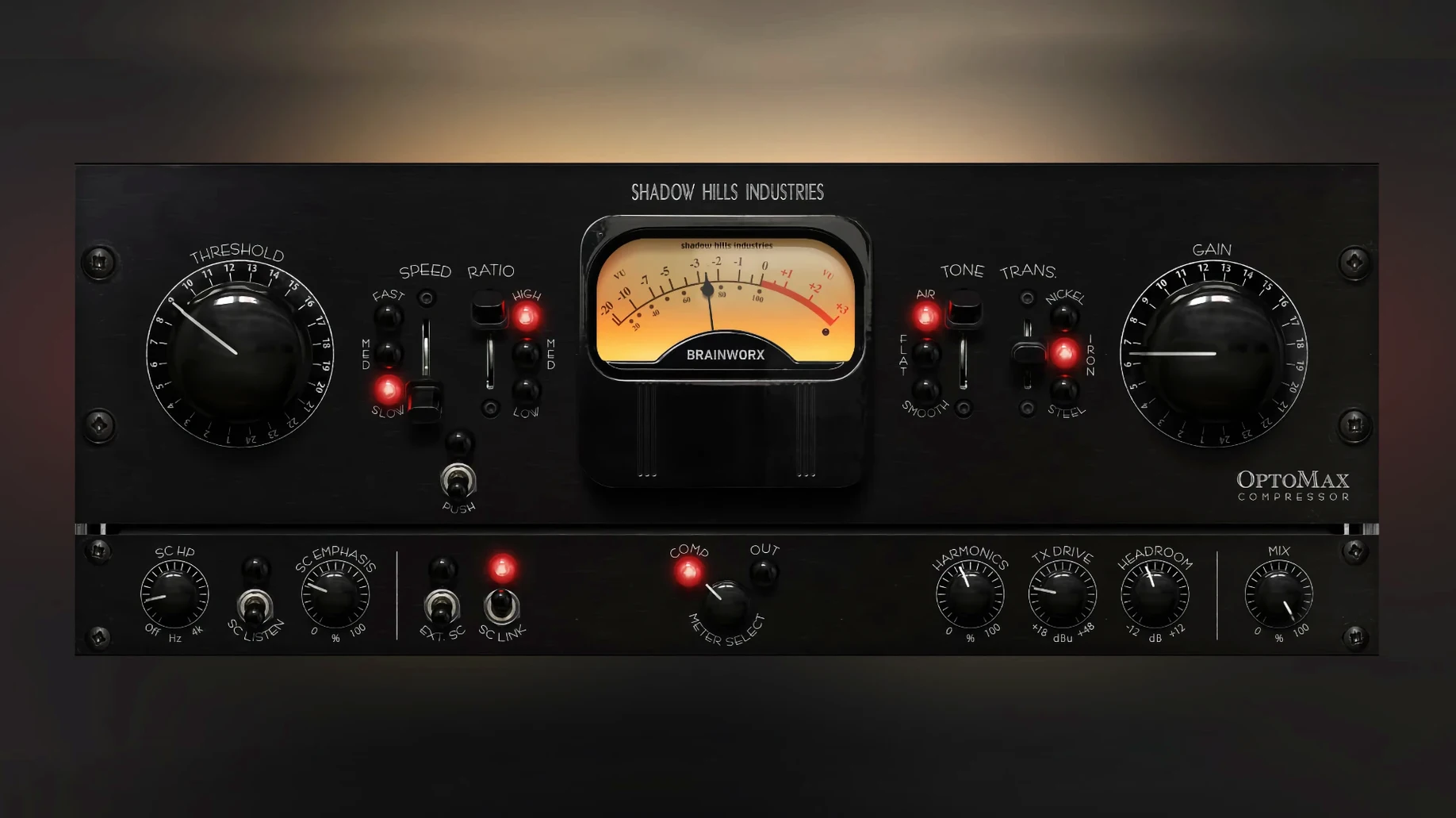
Softness — a switchable high-frequency mode that stops the optical circuit from reacting too strongly to sharp transients.
Discrete optical response — the plugin models a light-dependent resistor, so gain reduction follows a musical, non-linear curve rather than a rigid ratio. It glues without obvious clamping.
Response timing — three positions. Slow lets the body of a sound breathe before the needle returns; medium suits a vocal that needs to stay forward; fast catches the initial pick attack on a strummed acoustic.
Sidechain filter — a tunable high-pass in the detector path. Run a full mix through the compressor while telling the circuit to ignore the kick drum, so the bass line alone shapes the movement.
A small thing, but telling: the gain reduction meter now reads correctly in Pro Tools. The 1.0.1 update addressed a display bug where the needle would freeze or misreport the amount of compression — a problem that only surfaced in Avid's environment and was never audible, merely disorienting. With the meter reflecting actual gain change, riding the threshold in a dense mix feels less like guesswork.
Everyday operation is otherwise identical to the initial 1.0.0 release. No new knobs, no shifted parameters. That continuity matters when a mix recall from last month needs to open without surprises.
Dynamic anchor: placing it before EQ and limiting
OptoMax does not try to be a channel strip, and that narrowness is its strength. It works best early in a chain — before an equaliser, certainly before a limiter — where it can catch the broad dynamic swings and hand a more settled signal downstream. On a vocal, placing it after corrective EQ but before a faster FET or VCA compressor gives the optical circuit room to breathe while the second stage handles peaks the opto cell would round off too softly.
With macOS 12 or later, the plugin loads in AU, VST3 and AAX formats. It presents itself to Logic Pro, Ableton Live and Pro Tools without ceremony. The sidechain input appears in any host that supports external keying: route a bass track to the sidechain of a mix bus instance, engage the high-pass filter at around 90 Hz, and the compressor ignores the kick while following the bass line's sustain. Logic's built-in sidechain routing makes this a one-click affair; in Live, a dropdown in the plugin window exposes the available sources.
Latency is low enough that inserting it on a drum room mic during tracking does not introduce a perceptible delay — useful when the optical circuit's slow release adds bloom to cymbals without pushing the snare back in time. Apple Silicon machines handle many instances without complaint; the plugin was compiled for both architectures from the start, so an M-series Mac runs it natively with no Rosetta translation step.
Conveniences that stay quiet
Several details are easy to overlook on a first pass:
- Mix control at unity gain. The parallel blend does not alter perceived loudness when set to 50 %. Slide it to taste without compensating elsewhere — the output stage keeps the level steady, so you hear only the change in dynamic texture.
- Transformer switching while playing. Nickel, iron and steel can be toggled during playback with no click or dropout. The change is immediate and reversible, which invites A/B testing mid-phrase rather than stopping transport.
- Shine and Softness together. Engaging both high-frequency modes at once produces a subtle but distinct tilt: Shine lifts air above 10 kHz while Softness rounds the transient edge in the same region. The result is an open top end that does not feel sharp — useful on a bright acoustic guitar that needs space without string noise.
- Threshold readout in dB. Hovering over the threshold knob shows a numeric value. This removes the need to squint at a silk-screened scale, which is helpful when matching settings across two instances on mirrored channels.
- Double-click reset. Every parameter returns to its default with a double-click. That includes the sidechain filter frequency and the mix control — small mercy when a setting has wandered too far during experimentation.
Points of friction and how to ease them
The optical model is inherently programme-dependent, which means the same knob positions produce slightly different compression curves on a sparse verse than on a dense chorus. When a vocal shifts from intimate to belted, the threshold may need a nudge of a decibel or two. Automation handles this cleanly: draw a shallow ramp on the threshold lane rather than toggling between two static values, and the transition disappears.
A second snag appears when the sidechain high-pass filter is set too high — above 120 Hz or so — and a bass-heavy track is the key source. The detector receives only the upper harmonics and may miss the fundamental entirely, causing the compressor to react to string noise or fret slides instead of the note itself. The fix is simple: sweep the filter down until the gain reduction meter moves in time with the bass line, not the finger sounds.
On Intel machines running large sessions, loading a separate instance on every track can eventually add up. Grouping tracks that share a dynamic range — say, a four-part horn section — and routing them to a bus with a single OptoMax instance preserves resources while keeping the cohesive feel the optical circuit provides. The nickel transformer setting on a horn bus tends to add a slight forward presence without the weight iron imparts, so experiment with all three before committing.
In short: a few deliberate moves with the sidechain, a little threshold automation, and a considered slot in the signal chain turn a simple optical compressor into something that shapes the contour of a whole arrangement.




Correspondence 0
Take a chair or join the table to send a letter.
No correspondence on this note yet. Letters are read before they appear.