 LeCoqRoti
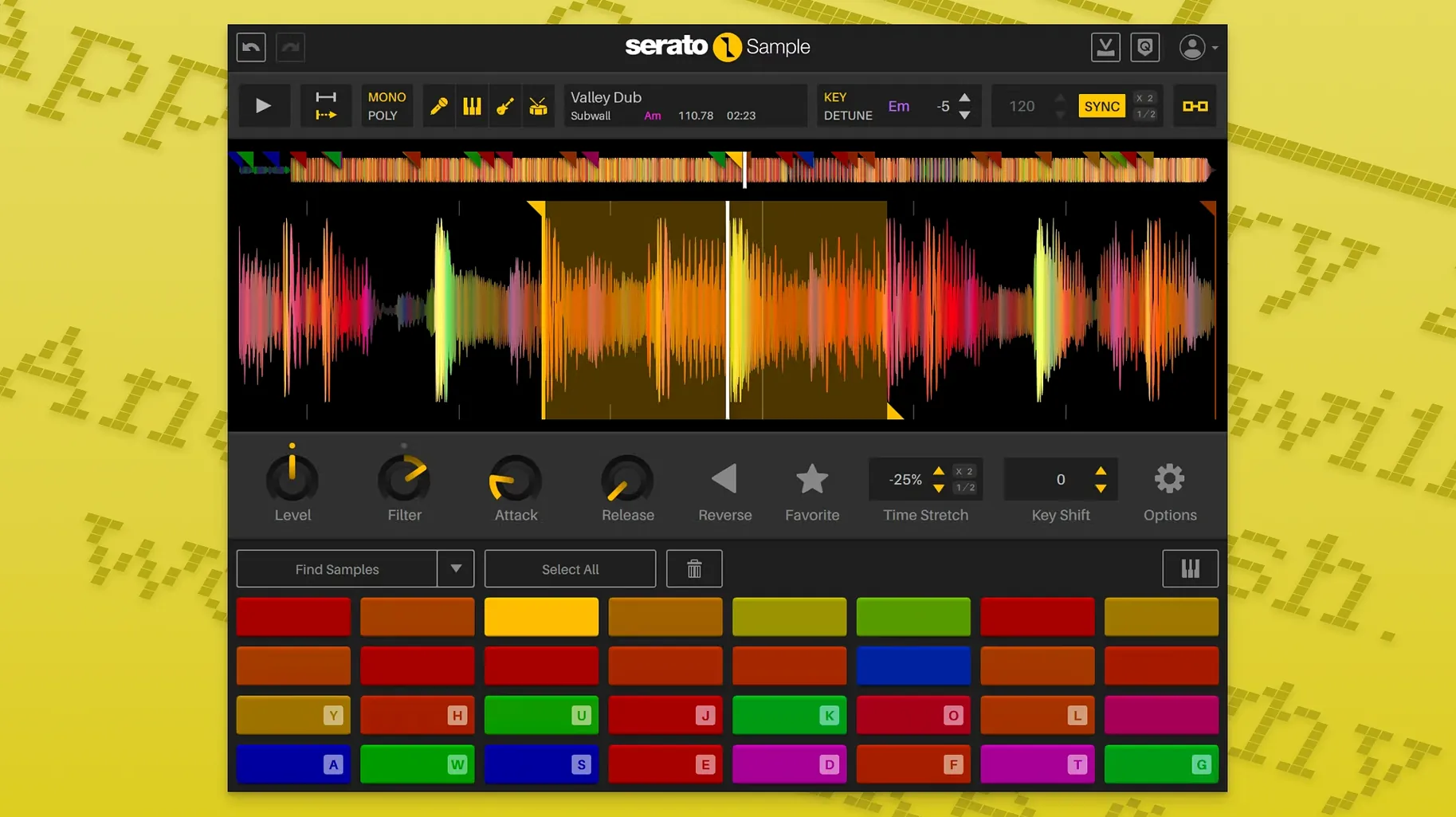
A raw piece of audio lands in your timeline. It has texture, a fleeting melody, a snatch of rhythm — but the tempo drifts, the key clashes, and the vocal you want is tangled with a bass line. Serato Sample exists for precisely this moment. It turns a single stereo file into a playable, project-locked instrument with independent control over its musical parts.
Where to begin: cue points and sync
Drop a sample onto a pad and let the engine detect its BPM and key. The sync locks instantly to your host tempo, so the first thing you hear is a phrase that already breathes with the track. Set cue points by clicking on the waveform; each marker becomes a triggerable slice.
Stems: pulling a recording apart
Right-click the sample and choose an acapella, melody, bass, or drum stem. The separation happens on the spot. From the mixer panel you can then adjust the level of each stem individually — bring the drums forward, mute the melody, or leave only the vocal floating over your arrangement. Both the stem on/off state and the individual levels are exposed as host automation parameters, so a DAW envelope can drop the bass stem out for a bar and bring it back.
Pitch and time: keeping character intact
The Pitch ’n Time algorithm handles independent pitch shifting and time stretching. Lower a sample by a fifth without slowing it down, or stretch a hit across two bars without chipmunk artefacts. Keyboard Mode maps the sample chromatically, which turns a short vocal stab into a melodic lead playable from a MIDI controller.
What to automate first
Assign the stem levels to hardware faders or draw envelope curves in your DAW. A slow fade of the drum stem while the acapella rises is a simple gesture that changes the entire feel of a loop, and it takes only a few seconds to set up.
No controller required: runs in any VST, AU or AAX host
One recurring question is whether the plugin requires proprietary hardware. It does not. Serato Sample runs in any DAW that hosts VST, VST3, AU or AAX formats; you do not need a Serato controller or DJ licence. A MIDI keyboard helps with melodic playing, but the on-screen pads and piano roll triggering work with a mouse alone.
Another concern is stem separation quality compared with dedicated online tools. The separation happens locally, not in the cloud, and the results are surprisingly clean on material where the mix isn't heavily crushed. A well-recorded soul track will yield an acapella with minimal artefacts; a brickwalled modern pop production may leave faint ghost notes in the isolated stems. It handles both extremes gracefully — you simply adjust stem levels to mask any residue.
People also ask whether the plugin introduces latency during live triggering. On a recent Apple Silicon machine, the response is immediate at buffer sizes of 128 samples or below. Intel users may need to raise the buffer slightly when running multiple stem separations simultaneously, but for standard chopping and pitch work the latency is negligible.
Short phrases over full tracks: why cue points need a clean loop
The most common misstep is loading an entire three-minute track and expecting clean results from the first cue point. Long audio files with tempo drift confuse the beatgrid detection; a better approach is to pre-select a four- or eight-bar phrase before dropping it onto a pad. The sync engine locks more tightly when the sample already has a stable internal pulse.
Another mistake is ignoring the stem level faders after separation. New users often toggle a stem off entirely when it clashes with their arrangement, missing the fact that reducing the bass stem to twenty percent retains a tactile low-end presence without muddying the kick drum. The faders reward subtlety far more than binary on/off decisions.
Some producers treat Keyboard Mode like a standard sampler and play the sample without adjusting the root note. If the sample is a vocal phrase in C minor and your track is in E-flat major, the chromatic mapping will fight the harmony until you set the correct base pitch in the plugin's key display. A quick tap of the detector button usually resolves this, but verifying by ear saves frustration later.
Finally, overlooking host automation mapping wastes one of the plugin's real strengths. Drawing a stem level envelope once and copying it across eight bars is fast; manually riding faders for every pass is not. Beginners who skip the automation setup tend to print audio early and lose the flexibility the plugin offers.
Filling a hollow beat: dragging a funk break onto the pads
A producer opens a half-finished beat in Ableton Live. The drums knock, the bass line moves, but the space between them feels hollow. She drags a dusty funk break from the browser onto a Serato Sample pad. The waveform spreads across the lower panel; within a second, the BPM readout shows 92.3 and the sync button pulses green. The break locks to the project's 87 BPM without stretching artefacts — the timing tightens, but the snare still breathes.
She sets four cue points on the kick, snare, hi-hat pattern and a guitar stab. Playing them from a MIDI controller, she records a new pattern into a clip. The original break is a stereo file, but the cue points isolate each hit cleanly because the beatgrid markers fall precisely on the transients. She nudges one marker left by a sixteenth note to catch a ghost note she almost missed.
Now she wants the vocal from a different section of the same record. She drags the file onto a second pad, right-clicks, and selects the acapella stem. After a short processing pause, the vocal floats alone. She dials the drum stem down to zero, keeps the bass stem at fifteen percent, and lets the melody stem sit at thirty. The result is a vocal that still carries a hint of its harmonic context, sitting naturally in the mix without competing with her existing bass line.
She draws an automation lane for the acapella stem level. Over four bars, the vocal rises from silence while the drum stem fades. The transition feels organic — less like a mute button, more like a musician stepping forward. She adds a pitch envelope to the last syllable, dropping it by a minor third using Pitch ’n Time. The syllable warps downward without slowing, landing like a tape stop but cleaner.
The session wraps with stems printed to audio tracks for final mixing. The whole process took under fifteen minutes.
Stem separation speed: four stems in four seconds on M1 Pro
Stem separation is the heaviest operation the plugin performs. On an M1 Pro with 16 GB of RAM, a thirty-second stereo file separates into four stems in roughly three to four seconds. Longer files take proportionally longer, but the plugin caches the separation; switching between stems afterward is instantaneous. On an older Intel i7 iMac, the same operation might take five to six seconds — a minor wait that occurs only once per sample.
During playback, CPU usage stays modest. Eight pads triggering simultaneously with independent pitch settings hover around six to eight percent on Apple Silicon. Adding stem automation lanes increases the load slightly but rarely pushes the plugin into audible dropout territory unless the host project is already dense. The plugin handles memory sensibly; it does not load the full sample set on instantiation, only when a pad receives audio.
Stability in daily work is solid. Crashes are rare and usually traceable to host-side issues rather than the plugin itself. One quirk worth noting: if you separate stems while the transport is running, some DAWs introduce a brief audio glitch. Pausing playback before processing avoids this entirely.
Upstream phrasing work: time-align and isolate before handing off
Serato Sample complements rather than replaces a DAW's native sampler. Where Live's Simpler excels at single-hit shaping with filters and envelopes, Serato Sample handles the upstream work — time-aligning a phrase, isolating its components, and handing off the results. Many producers use both: Serato Sample for extraction and sync, then Simpler or Kontakt for detailed sound design on the isolated stems.
The plugin also pairs naturally with drum replacement tools. After separating drum stems from a break, the isolated kick and snare hits can trigger layers in a drum rack without the original cymbal bleed. The MIDI from cue-point triggering can be recorded and reused to drive other instruments, turning a sampled rhythm into a score that plays a synthesizer or a bass patch.
macOS integration is straightforward. The AU version loads in Logic Pro and exposes stem parameters to Logic's automation system without extra configuration. Keyboard Mode respects the system's MIDI routing, so a Bluetooth controller works as well as a USB one. The plugin also follows the system's dark mode setting — a small detail that keeps the interface from jarring against a dimmed studio screen. Drag-and-drop from the Finder works reliably; dropping a file from Voice Memos or a field recorder directly onto a pad starts the analysis immediately, which suits a quick workflow where samples arrive from various sources throughout a session.


Correspondence 0
Take a chair or join the table to send a letter.
No correspondence on this note yet. Letters are read before they appear.