 LeCoqRoti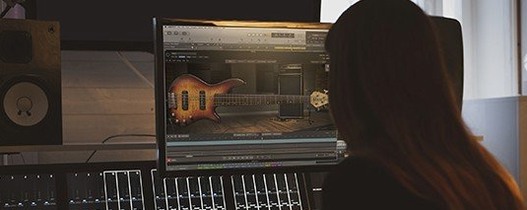
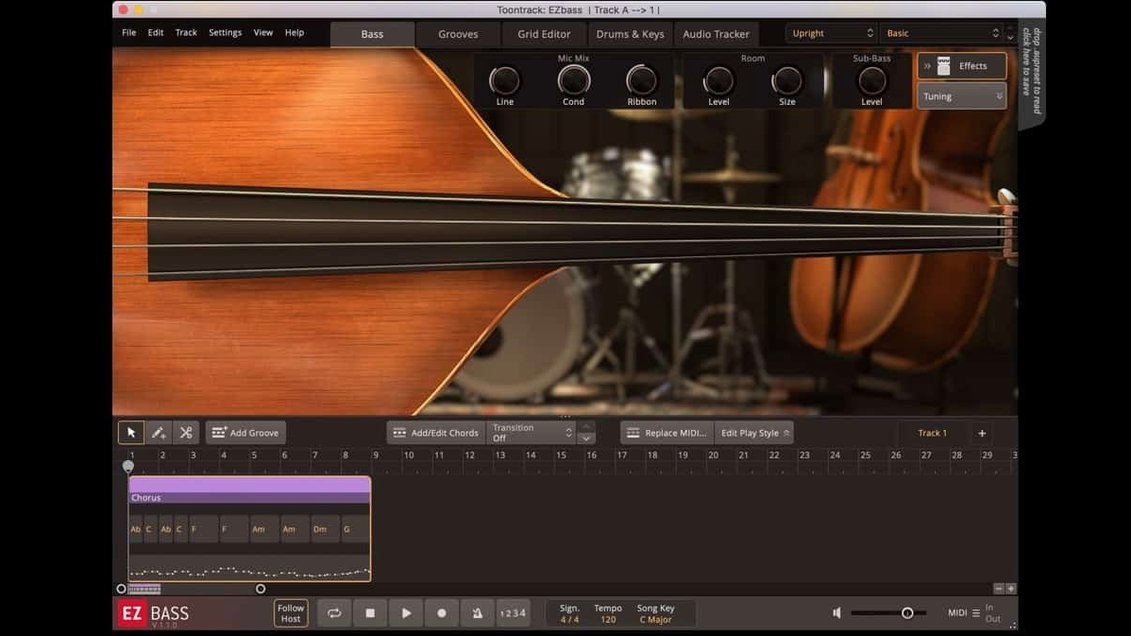
Two sampled basses, one vintage and one modern, sit inside version 1.3.3 alongside a grid full of MIDI basslines. The software does not just play notes: it converts audio into MIDI using the same detection engine found in Superior Drummer 3, so a hummed line or a rough guitar recording becomes editable bass data.
The arrangement panel lets you compose, change, and restructure parts without leaving the window. Drag a verse to a chorus slot, swap a fingered pattern for a picked one, or shorten a fill: the instrument responds immediately. Each bass was captured with fingers and pick, giving the two instruments distinct attack textures that sit differently in a mix.
A recent update added right-hand mute articulation from the Rock Legend EBX expansion, which tightens staccato notes and gives palm-muted passages a drier, more percussive feel. Keyboard shortcut customisation arrived in the same release, accessible from the Settings section, letting you remap grid navigation and transport controls to fit a familiar editing rhythm.
Who benefits most: producers and editors with a deadline
Songwriters working alone tend to reach for EZbass at the sketch stage, when a drum loop and a few chords need a bassline before the idea goes cold. The MIDI library covers enough ground that a verse and chorus can be blocked out in minutes, then refined once the vocal has found its shape. Producers with a rough mix in progress use it the same way a scratch vocal is used: as a placeholder that often survives into the final arrangement because it already sits well.
Composers scoring to picture find the audio-to-MIDI side more valuable. A bass phrase recorded on a phone, a line played loosely on guitar, even a low percussion hit can become editable MIDI in the same grid as the sampled instruments. That conversion inherits the detection logic from Superior Drummer 3, which shows in the way transient and pitch information survive together: a slide is not flattened into a single MIDI note, and a grace note stays where it was played.
Music editors get a quieter benefit. Because EZbass lives inside the timeline as a plug-in, changes to a cue can be made without bouncing stems back and forth. A director asks for the bass to drop out of the second half of a scene; you open the arrangement panel, shorten the part, and continue working.
The 1.3.3 update: small fixes that change the workday
The right-hand mute articulation added in this release matters most to anyone working with the Rock Legend EBX expansion. Muted notes now respond with the same tightness in EZbass as they do in a dedicated rock context, which makes palm-muted passages feel less synthetic and more like a player damping the strings.
Keyboard shortcut customisation is the update that affects everyone, whether or not they own an expansion. Transport controls and grid navigation can now be remapped in Settings, which means a producer who edits in Logic all day can bring EZbass closer to the key commands already in muscle memory. The change is modest on paper; in practice it removes a layer of friction every time you switch between the host and the instrument window.
Two Mac-specific fixes complete the release. The standalone icon and project icon now follow the macOS Tahoe style, which keeps the dock tidy on newer systems. Menu click response has been corrected in recent Apple hosts, and audio export no longer drifts at sample rates other than 44.1 kHz. The last fix is easy to miss until it saves a project: edit at 48 kHz, export at 48 kHz, and the bass stays exactly where you placed it.
Working with other applications and macOS
EZbass sits comfortably in a host-based workflow. In Logic Pro, the instrument loads as a software instrument track and responds to the same transport commands, so a bass part can be punched in and out without opening a separate editor. In Ableton Live, the arrangement panel complements the session view: MIDI patterns can be dragged from EZbass into clips, then warped and looped like any other material.
On macOS the software behaves like a native citizen. It runs on both Apple Silicon and Intel machines, which means a project started on a studio Mac Pro can move to a MacBook Air without a compatibility conversation. The standalone application is useful for auditioning patterns and building a library of bass parts before committing to a host session.
EBX expansions extend the instrument without changing the workflow. A new bass or a set of articulations appears in the same browser and the same arrangement panel; no new window, no second learning curve. The right-hand mute support in 1.3.3 is a good example of how an expansion can enrich the core software long after the original install.
Conveniences worth knowing
A few details make the work faster once you notice them. The grid accepts drag-and-drop from the MIDI library into the arrangement panel, so a part can be moved, copied, or replaced without touching a menu. Double-clicking a pattern opens it for step editing, where individual notes can be nudged, lengthened, or deleted with the arrow keys.
Conversion works both ways: a MIDI bassline can be auditioned through either of the two included basses, and the switch is instant. A part written for the vintage instrument takes on a different character through the modern one, not just a different timbre but a different relationship between note length and attack. That alone is a reason to keep both basses loaded while arranging.
The audio-to-MIDI converter accepts more than clean bass recordings. Guitar, piano, and even low percussion can be fed in, and the resulting MIDI often needs only light cleaning before it works as a bass part. Musicians who do not play keyboard will find this the fastest route from a sung or hummed line to something the editor can refine.
Keyboard shortcuts are worth a second look after updating to 1.3.3. The new customisation options live in Settings, and a few minutes spent remapping transport and grid commands pays back across every session. It is a small thing, but small things accumulate when a tool is used daily.
In short: EZbass puts a complete bass-writing toolkit under one interface—sound, pattern, conversion, and arrangement—without asking you to leave the timeline.




Correspondence 0
Take a chair or join the table to send a letter.
No correspondence on this note yet. Letters are read before they appear.