 LeCoqRoti
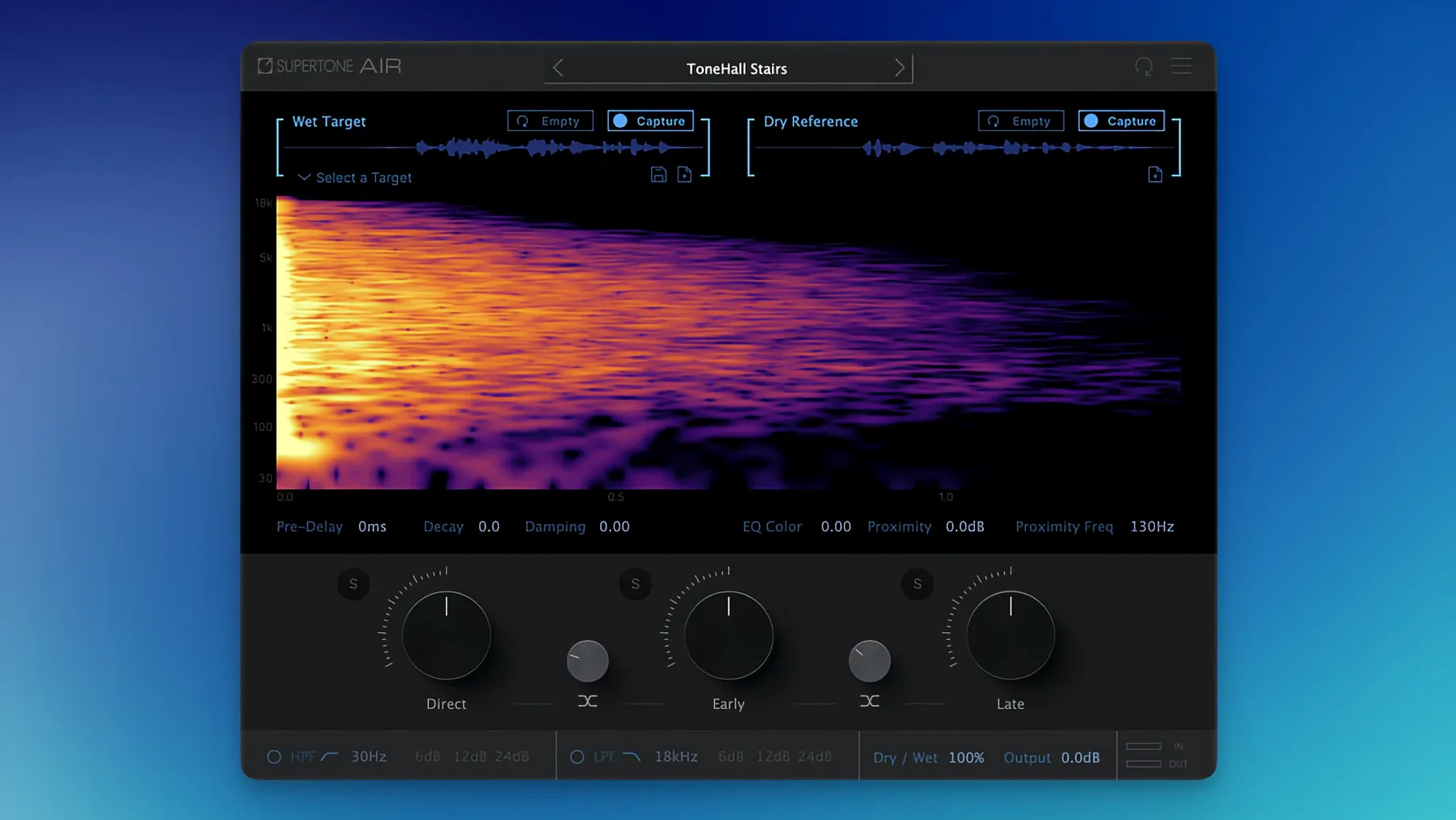
ADR sessions often arrive with a gap between the tight, dry booth recording and the airy, coloured sound of on-set dialogue. That gap pulls a listener out of the scene. Supertone Air closes it by analysing the acoustic imprint of a reference clip — its reverberant tail and spectral shape — and transferring those characteristics to a clean take.
A place in the session: tracks, buses and typical jobs
- Reference analysis on the guide track. Insert Air on the original production dialogue channel. Let it learn the space: early reflections, decay curve, damping and the overall EQ fingerprint. The capture is fast, non-destructive, and can be saved as an Air profile for reuse across an episode.
- Processing the ADR take. Move the plug-in to the newly recorded dialogue track. Load the captured profile or drag the settings across. Air applies the matched reverb and EQ, pulling the voice into the same acoustic world as the location sound. The reverb controls — decay, damping and proximity — stay live for fine adjustment without re-capturing.
- Buss treatment for group matching. Place Air on a dialogue buss when several loop-group or crowd lines need the same room signature. A single profile across the buss keeps the ambience consistent, leaving the individual channels dry for editing.
- Offline rendering in AudioSuite. For long-form work, Air is optimised for AudioSuite processing. Render the effect directly into the clip; the plug-in’s low CPU footprint at 44.1, 48 and 96 kHz makes batch processing straightforward.
- Exporting impulse responses. The captured space can be exported as a WAV file. Drop it into any convolution reverb for sound design or archive it with the project’s metadata.
In short: Air sits where dialogue moves from clean to credible. It is a focused tool for one delicate task, and it avoids the clutter of a general-purpose reverb.
Dialogue editors on windy dramas: matching dry ADR to exteriors
A dialogue editor cutting drama for a streaming series will reach for Air on nearly every episode. The show alternates between interior domestic scenes and windy exteriors, and the ADR recorded in a treated booth arrives bone-dry. Matching each line individually with a general reverb and EQ takes twenty minutes per scene; with Air, a single capture from the boom mic guide track handles a whole conversation. The time saved accumulates across a season.
Re-recording mixers on independent films benefit differently. They receive stems where the dialogue editor has already applied Air profiles, but they keep the plug-in on the dialogue buss for final tweaks. A slight reduction in proximity on a close-miked courtroom scene, or a half‑second extension of decay on an echoey stairwell, happens without leaving the mixing environment. The profile remains the anchor; the controls let the mixer nudge, not rebuild.
Sound designers working in game audio use Air as a space‑capture utility more than a dialogue tool. Recording foley or crowd walla in a dry studio, they capture impulse responses from location recordings — a stone corridor, a van interior — and export the WAV files for the game engine’s convolution reverb. The EQ matching is secondary here, but it saves a round‑trip through a separate analyser.
Users who work mostly with music or live‑sound reinforcement will find Air less relevant. It is built for the spoken word, not for drum rooms or vocal plates. Its strength is transparent matching, not creative sound design. If your work rarely involves ADR or location dialogue repair, the plug-in sits outside your usual path.
Comparisons: three adjacent tools
iZotope Dialogue Match. The closest cousin. Dialogue Match also captures reverb and EQ from a reference clip and applies them to a target, operating as an AudioSuite process in Pro Tools. It adds an ambience module for background fill, which Air omits. Air pulls ahead in speed: its capture is a single‑click operation, whereas Dialogue Match requires the user to select separate reverb and EQ sections manually. The interface on Air is sparser, which keeps it lighter on screen during repetitive ADR passes. For editors who only need reverb and EQ matching without background‑bed creation, Air is the more direct instrument.
Accentize Chameleon. Chameleon uses machine learning to match the spectral and spatial character of one recording to another, and it works on dialogue, foley and music. It offers more granular control over the envelope and formant matching, which can rescue takes recorded at different distances. Air stays narrower in scope — it does not touch formants or transients — but that narrowness makes it harder to misuse. Chameleon rewards a careful ear; Air rewards a fast deadline. They complement more than they compete.
Zynaptiq UNVEIL. UNVEIL is a de‑reverberation and signal‑focusing tool, not a matching tool. It can reduce the room tone on a lavalier recording or separate direct sound from ambience, which is the inverse of what Air does. A dialogue editor might use UNVEIL to clean up a noisy location take, then use Air to add back a controlled, matching space. The two plug-ins sit at opposite ends of the workflow but occasionally touch the same session.
Kitchen argument cue: replacing a noisy line with a clean reference
The scene is a kitchen argument from a forty‑minute drama. The director wants to replace a line delivered with a clatter of pans in the background. The original take is usable as a reference: a close‑miked boom recording, a little room reflection, a dip in the low‑mids from the wooden cabinets.
You open the Pro Tools session and insert Supertone Air on the original dialogue track. The plug‑in window is compact — a spectral display at the top, reverb controls beneath. You hit Capture and play two seconds of the reference line. The display populates with a curve: the EQ fingerprint in white, the decay tail in a soft gradient. You save the capture as Kitchen_Argument.air.
You move the plug‑in to the ADR track, load the profile, and play the new take. The voice, recorded close in a dead booth, now carries the same subtle slapback from the tiled wall behind the stove. The low‑mids drop away just enough to match the original’s thinness. It is close, but not quite there — the actor spoke a little further off‑mic than the reference suggests.
You nudge the Proximity slider to the right, adding a few percent of early‑reflection warmth. The voice settles into the room. You bypass the plug‑in to check: the dry take jumps forward, flat and alien. You toggle back. The match holds. You render the clip with AudioSuite and move on to the next cue, leaving the profile saved for the three other lines that share this kitchen setup.

Correspondence 0
Take a chair or join the table to send a letter.
No correspondence on this note yet. Letters are read before they appear.