 LeCoqRoti
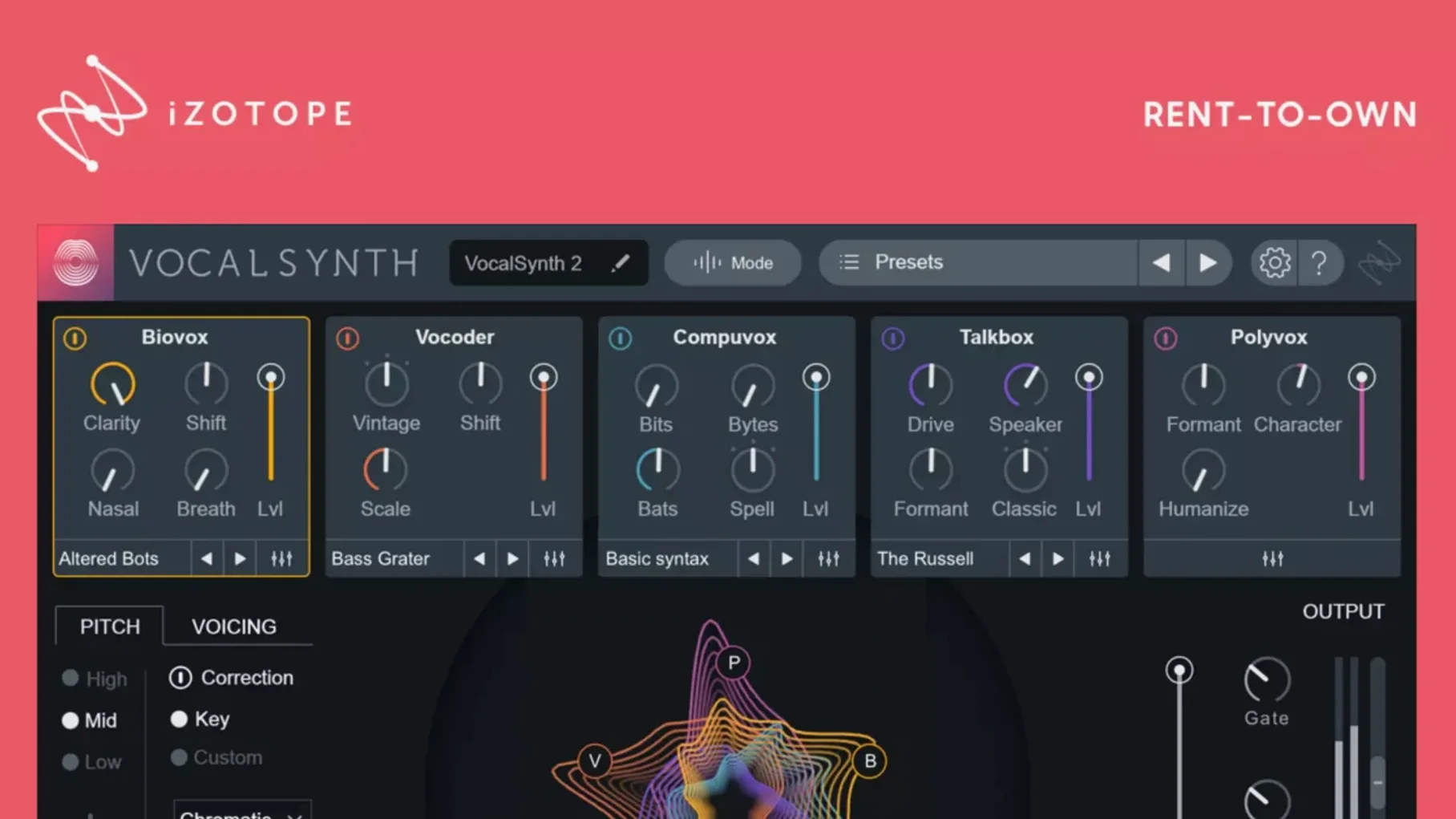
Anyone who has spent time with iZotope's Nectar will find VocalSynth 2 a more radical, synthesised cousin: where Nectar polishes a vocal to sit in a mix, this plug-in rebuilds it from the inside out using synthesis and spectral processing. It runs as a VST, AU or AAX plug-in on both Apple silicon and Intel Macs.
Processing mode — Auto follows the incoming pitch, MIDI lets you play the vocal like an instrument, and Sidechain uses another track to drive the effect.
Signal path — five modules (Biovox, Vocoder, Compuvox, Polyvox, Talkbox) sit in a chain; each can be reordered, blended and muted independently. The result runs from glassy, talkbox-style textures through grainy digital artefacts to dense, choir-like stacks. A central XY pad morphs between four snapshots of the full module state, which makes live performance or quick contrast work feel immediate.
Stability and speed: light on resources, predictable under load
A plug-in that runs five synthesis engines in parallel ought to feel heavy. VocalSynth 2 rarely does. On an Apple silicon Mac the native build loads quickly and settles into a modest CPU footprint — typically a few percent for a single instance with two or three active modules. Stacking all five modules and the onboard effects pushes that higher, naturally, but the processing spread stays linear rather than spiking unpredictably. On Intel machines the demand is higher but still workable, especially if you freeze tracks as a matter of habit.
Latency is low enough to track through comfortably in Auto mode at a 128-sample buffer. MIDI mode introduces a tiny additional delay, barely perceptible unless you are playing fast staccato lines from a keyboard. I have yet to see a crash triggered by VocalSynth 2 itself, though loading projects saved with version 2.5.0 into a 2.6.1 session caused a brief authorization hiccup on one machine — the exact scenario the patch note addresses. Clearing the iZotope Product Portal cache and re-launching the DAW sorted it within minutes.
What 2.5.0 and 2.6.1 quietly changed
The move to native Apple silicon in version 2.5.0 was the headline, and the practical difference is simply that the plug-in no longer runs through Rosetta. Session-load times fell by roughly a third on my M1 Max studio machine; the spectral display redraws with noticeably less lag when you drag formant or shift parameters. Monterey 12.3.x compatibility also landed in that release, which mattered to anyone who had held off updating macOS for fear of breaking their vocal chain.
Version 2.6.1 is a single-point fix: some users who updated from 2.5.0 found their existing authorization unrecognised. The symptoms were a prompt to re-activate despite a valid licence, and occasionally a silent failure where the plug-in would pass audio but refuse to engage any module. The fix restores normal behaviour without requiring a full reinstall. If you encounter the issue on a system that skipped 2.5.0 entirely, running the installer again with the included activation instructions is the surest path.
Keyboard shortcuts: double-click a module to toggle all five
A few shortcuts sit just below the surface. Double-clicking any module power button toggles all five modules off or back to their previous state — useful for A/B comparisons without touching the master bypass. Right-clicking a module tab copies its settings, and pasting to another instance keeps the blend and wet/dry balance intact, which speeds up building consistent vocal treatments across a chorus or double-track.
The XY pad can be assigned to any MIDI controller with learn functionality; moving a physical fader or joystick while holding Command (or Control on some hosts) maps it to the X or Y axis respectively. In a live set, this turns the pad into a performance surface rather than a mouse-driven curiosity. Also easy to miss: the spectral display shows vowel formants as coloured contours, and clicking directly on a formant band nudges the Biovox module's shift parameter toward that vowel sound. It is a fast way to dial in a target timbre without scrolling through presets.
Sidechain routing: load only on audio tracks in Logic Pro
Sidechain routing confuses people more than it should. In Logic Pro, the sidechain input appears only when VocalSynth 2 is loaded on an audio track — not an instrument track — and a signal is present on the chosen sidechain source. If the plug-in stays silent in Sidechain mode, check that your source track is playing audio and that the DAW's transport is running; VocalSynth 2 reads sidechain input in real time, not from pre-rendered buffers.
Another recurring complaint is a thin, phasey output when the Vocoder and Compuvox modules are active together at high blend levels. The fix is to reduce the internal mix of one module slightly and engage the onboard chorus effect at a low depth, which thickens the stereo image without the comb-filtering artefact. If the spectral display freezes or shows flat grey bars, toggling the plug-in window closed and open again forces a redraw; this happens occasionally in hosts that sandbox plug-in graphics.
Those searching for an iZotope VocalSynth 2 torrent or a VocalSynth 2 free download sometimes end up with a build that predates version 2.5.0. The tell is a missing Apple silicon native option and a spectral display that stutters under mouse movement. A VocalSynth 2 crack Mac circulating on certain forums exhibits exactly this behaviour, along with intermittent authorization prompts that the 2.6.1 patch was specifically written to resolve. To get the spectral display running smoothly, ensure the host DAW is launched under Rosetta 2 and the audio buffer is set to 512 samples or higher.
In short: a voice-through-synthesis engine that rewards layering and restraint in equal measure.





Correspondence 0
Take a chair or join the table to send a letter.
No correspondence on this note yet. Letters are read before they appear.