 LeCoqRoti
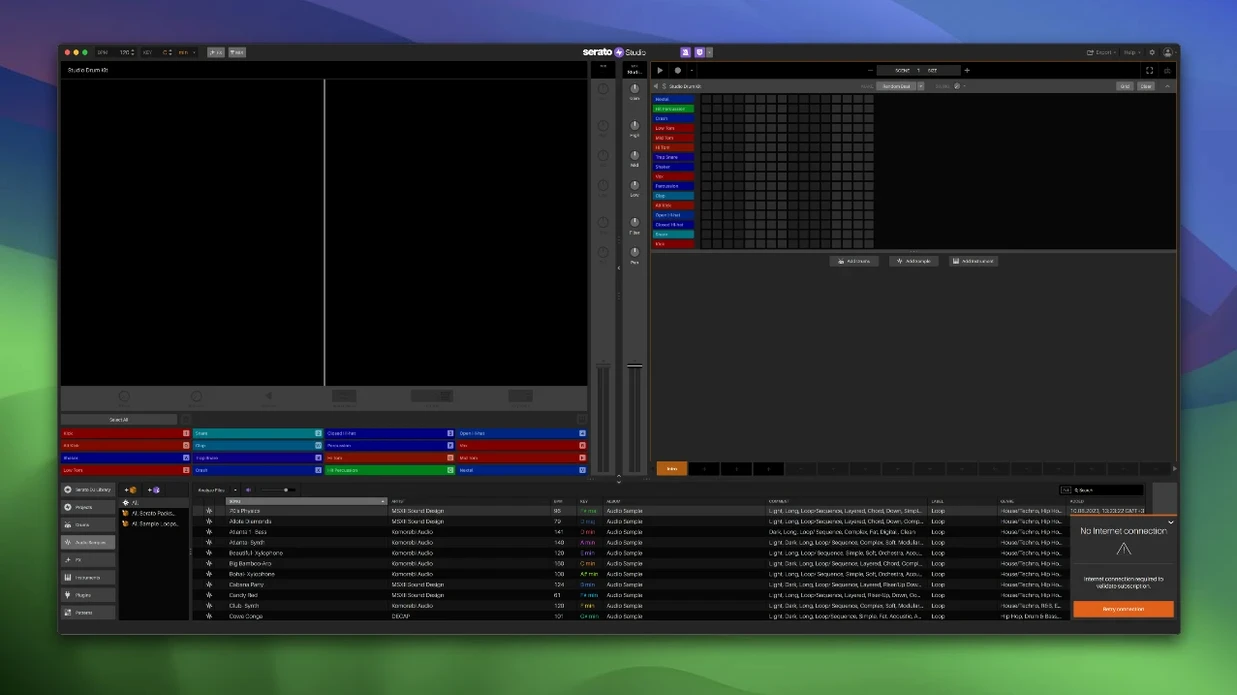
Auto Chord mode turns a single-finger idea into a full harmonic structure, pulling chords from the project key without breaking the flow. The application sits comfortably next to a DJ’s existing tools: waveforms share the familiar colour palette of the Serato DJ library, and the mixer channel behaves the way a DJ expects. It is production software that understands where a producer is coming from.
- Library crossover: Crates, track ratings and search work across the DJ library, so a beat can begin with a vocal snippet pulled from a favourite crate.
- Stem automation: Acapella, melody, bassline and drum stem levels can be automated inside Sample Decks, with Stems On/Off written into Scene View.
- Feel control: A timing offset that imitates a live keyboard player, loosening quantised parts without manual note-dragging.
- Plugin compatibility: VST and AU instruments and effects load directly into the rack, extending the sound palette beyond the built-in tools.
- Hardware handshake: Native control for AlphaTheta SLAB and support for DJ controllers keep the hands-on workflow intact.
The arrangement stays lean: a Scene View for structure, a mixer channel for balance, and effects applied where they serve the groove. macOS 26 Tahoe support keeps it current, while the 10.14 floor leaves room for older studio machines. In short: a production environment that speaks the same language as the DJ booth.
Starting a track: drag a favourite-marked vocal into a Sample Deck
A session often begins in the library. You drag a vocal phrase from a crate tagged with the new favourite marker — a small quality-of-life touch that makes large collections navigable. The waveform lands in a Sample Deck, coloured the same way it appears in Serato DJ, and the project key is set. Auto Chord is switched on: a single note on the laptop keyboard now produces a full triad, moving diatonically as you shift up or down. The harmonic scaffolding appears before any drums are placed.
Next comes rhythm. A ready-made drum pattern is auditioned from the built-in kits, then dropped into the Scene View. BPM syncing locks it to the sample without nudging. You pull the acapella stem level up in the Sample Deck, dropping the bassline and drum stems to silence — the vocal floats alone over the beat. A few bars later, the melody stem fades in via an automation lane drawn directly in Scene View, its curve visible as a thin white line across the waveform. The transition feels like a filter sweep, but it is actually four stem faders moving in precise opposition.
Effects come last. A VST reverb is loaded into the mixer channel insert, its wet/dry balance automated for the final four bars. The Feel control is nudged to the right on a piano part, introducing a barely perceptible lag that softens the attack. The whole sketch — sample, drums, chords, automation — takes perhaps twenty minutes. Exporting the stems for a collaborator is a single menu command.
Stem level adjustment: from on/off switch to individual faders
Version 2.5.0 is not a visual overhaul. It sharpens details that affect how a producer moves through a session. The most immediate change is the individual stem level adjustment inside Sample Decks. Previously, stem separation was an on/off affair; now acapella, melody, bassline and drum stems each have their own fader. Running a vocal acapella over a different bassline — while muting the original drums — has become a single-panel operation rather than a routing puzzle. Combined with Scene View automation for Stems On/Off and individual levels, the Sample Deck turns into a miniature remix environment without leaving the arrangement.
Library navigation also received quiet improvements. Track Rating and Favorite Crates bring the browsing experience closer to the DJ software, while Crate Search removes the scroll-hunting that slowed down crate-heavy users. A producer working across both Serato DJ and Serato Studio can now rate tracks during a DJ set and have those ratings visible when building beats the next morning. The Reverse Pad Order option in the setup screen addresses a longstanding hardware preference for left-handed or bottom-up pad layouts — minor in description, but meaningful for muscle memory on a controller.
On the compatibility side, native control for the AlphaTheta SLAB arrives alongside macOS 26 Tahoe support, keeping the software aligned with both current Apple silicon machines and the latest DJ hardware ecosystem. The 10.14 floor remains, so an older Intel Mac in a secondary studio role is still viable.
DJ-to-producer bridge: a mixer channel and crate browsing you already know
The obvious audience is the DJ who wants to produce without learning a traditional DAW from scratch. The interface borrows enough from the Serato DJ world — coloured waveforms, a familiar mixer channel, crate-based browsing — that the cognitive leap is small. A touring DJ with a few hours in a hotel room can sketch an idea using the same library they played from the night before, then export stems for a collaborator to finish.
Less obvious are sample-first producers who treat the DAW as a canvas for manipulated audio rather than MIDI composition. The stem separation controls in version 2.5.0 make the Sample Deck a credible alternative to dedicated stem-separation plugins, with the advantage that automation lives inside the arrangement rather than as printed audio. A producer building tracks from old recordings, field audio or vinyl rips will find the workflow unusually direct.
Beat-makers coming from hardware samplers also settle in quickly. The Scene View functions like a pattern chain, the pad layout mirrors controller hardware, and the Feel control replicates the loose timing of a sampled phrase played by hand. It is a software environment that resists the temptation to over-engineer what a beat actually needs: a good sample, a solid drum pattern, and a way to structure them without distraction. For those looking to obtain the application, serato studio download searches point to the current version, while users investigating offline or alternative installation methods sometimes look for serato torrent or serato mac torrent routes; others query serato studio torrent or serato studio crack mac when seeking patched versions — and the build described here is the full 2.5.0 release with native Apple silicon and Intel support.





Correspondence 0
Take a chair or join the table to send a letter.
No correspondence on this note yet. Letters are read before they appear.