 LeCoqRoti
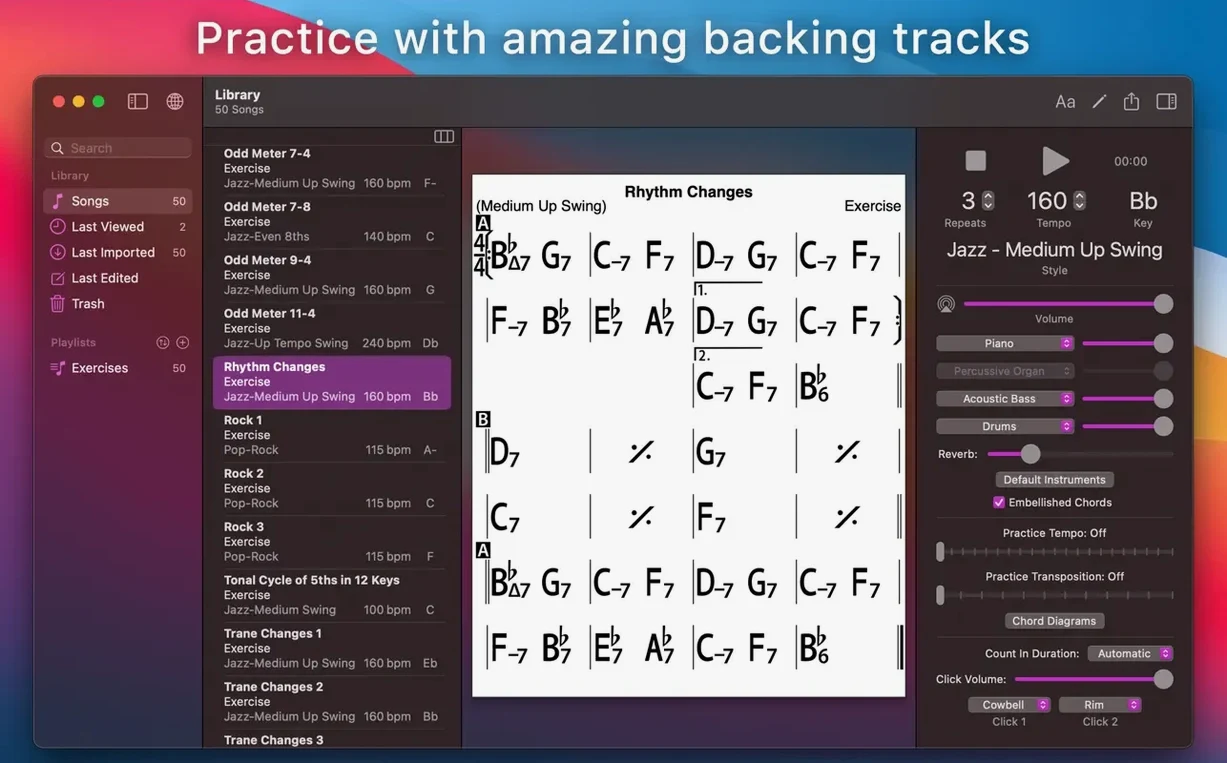
The mixer section drops out the piano, leaving bass, drums and a soft Latin percussion bed. For a designer who practises standards after hours, iReal Pro sits between notation software and a backing-track library: it is a chord-chart editor that also plays along. The Mac version stands apart from the iOS and Android editions, designed to feel at home on a desktop display.
Between a recorder and an engraver: practice band that never tires
iReal Pro does not record audio or print engraved notation. It handles the job between those two poles:
- Practice and rehearsal: call up a chart, set the tempo and style, and the band plays. Fifty-one accompaniment styles cover jazz, Latin, pop and more.
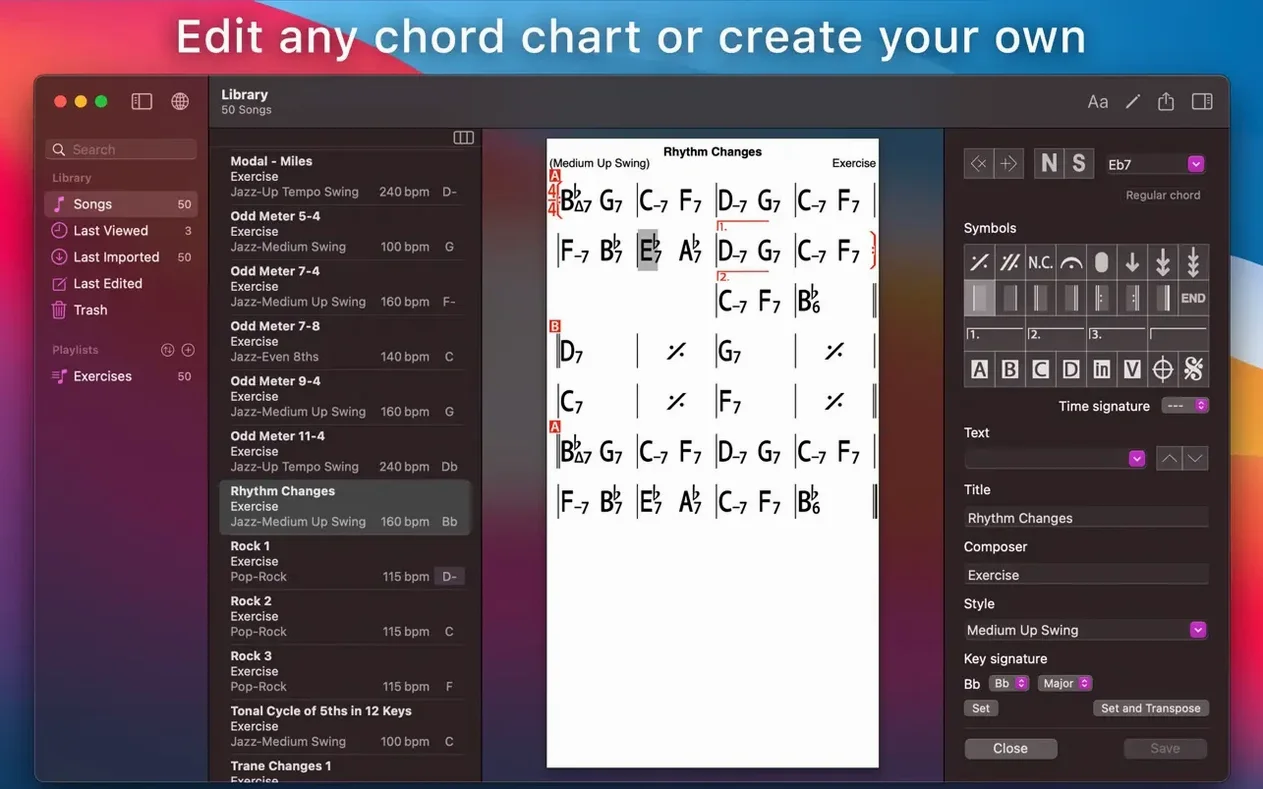
- Chart editing and transposition: create, edit and print chord charts. Transpose instantly to any key or switch to number notation — useful when a singer changes range at the last moment.
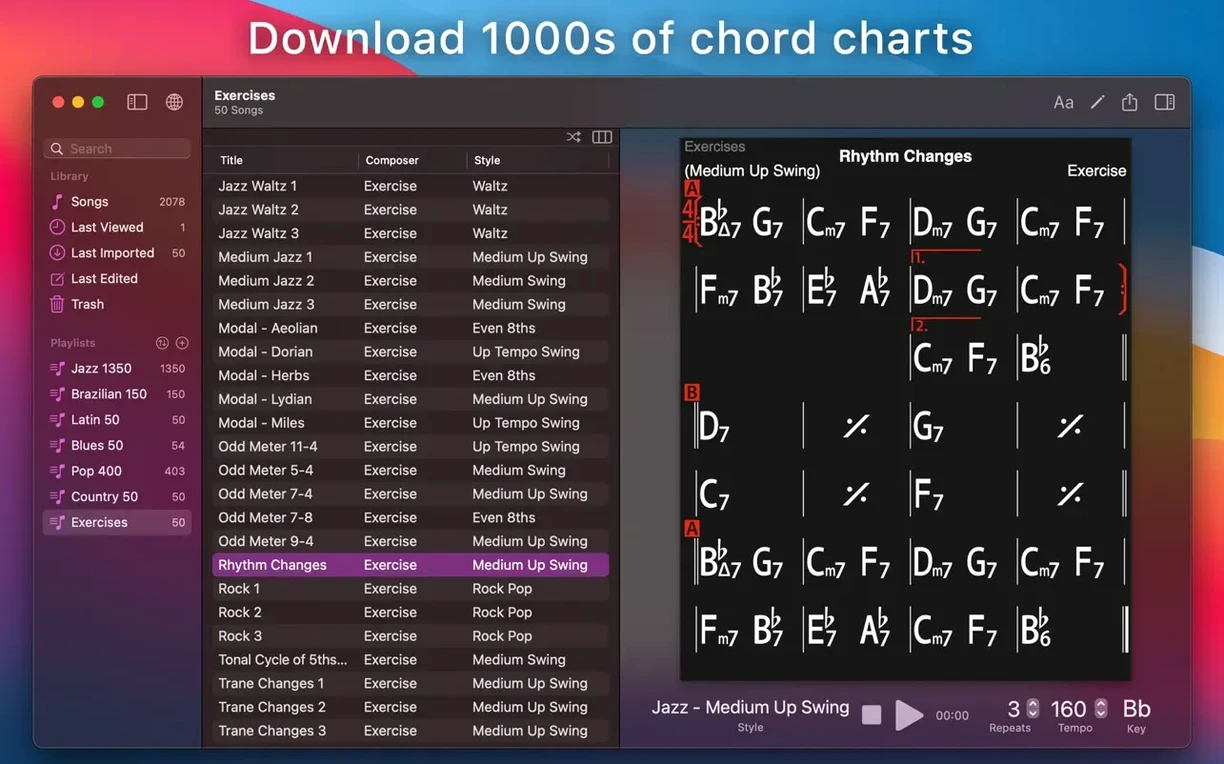
- Organisation and sync: collect charts into editable playlists and sync them across devices with iCloud. Fifty exercises for common chord progressions are built in.
- Community material: import and play songs created or downloaded by other users, which expands the library well beyond the included content.
Grid-and-symbol chart editor: mix and style controls one click away
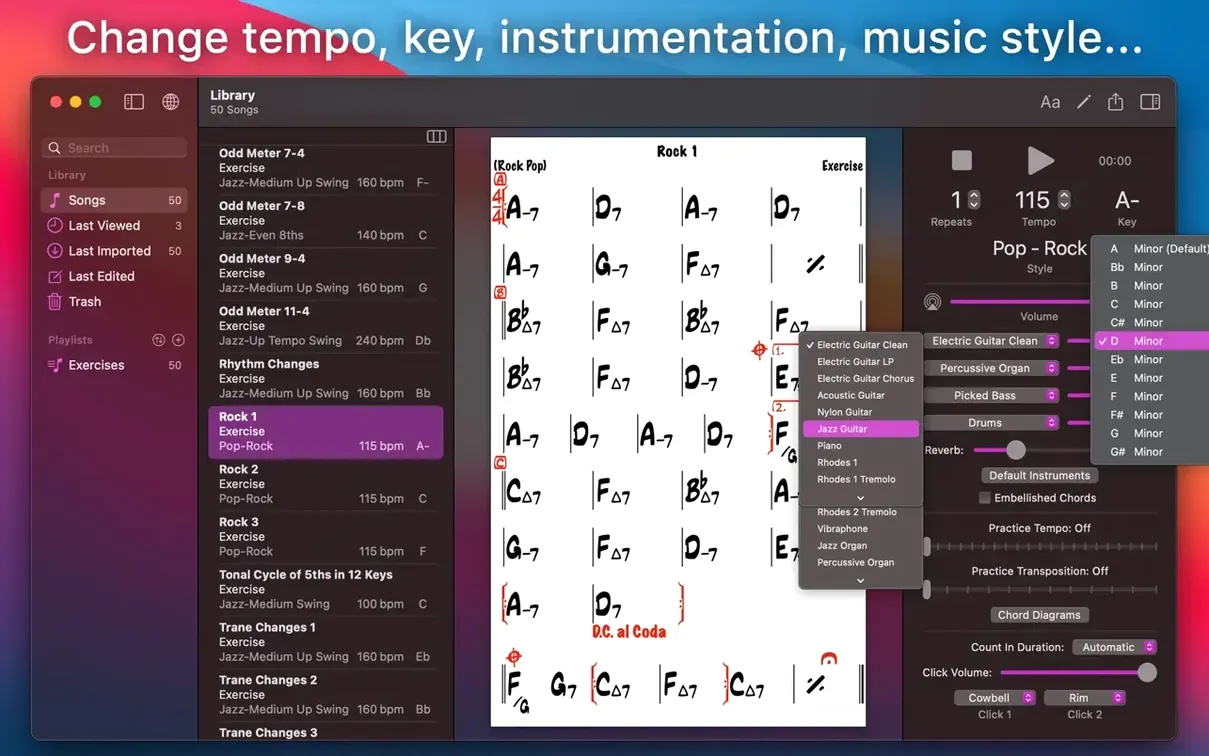
The chart editor follows a simple grid-and-symbol logic. There is no visual clutter, just the chord names, bar lines and a compact transport panel. The mixer and style picker sit close by, so you can adjust the rhythm section without leaving the chart. In short: a utility that understands the practice room, not the stage.
Skip the style scroll: build a four-tune repertoire first
Open software like this and the instinct is to scroll through styles, audition a few, then move on. That misses what makes iReal Pro stick. The first sessions are better spent building a small repertoire — four or five tunes you know well — and living with them across different keys and tempos. Transpose Autumn Leaves into E♭, then into B, and listen to how the voice-leading shifts in the piano comping. The app reveals things about harmony that a static lead sheet never does.
A second habit: treat the mixer as an instrument, not a set-and-forget panel. Pull the bass up and drop the piano to half volume for a duo feel. Mute the drums entirely and practise with only bass and a light guitar pattern — the time has to come from you, not from a hi-hat. The 51 accompaniment styles reward this kind of shaping; a bossa nova played with brushes at low volume feels entirely different from the same chart pushed through a loud rock kit.
The third habit is organisational. Start a playlist called “Working set” and limit it to charts you are actively learning. iReal Pro syncs with iCloud, so that playlist appears on an iPad or iPhone without any extra step. For a teacher moving between a studio Mac and a lesson-room tablet, this alone saves minutes every session.
Count-in defaults: one bar is rarely enough
Fresh from installation, the app makes a few assumptions that are worth reversing. Open Preferences and attend to three things:
- Playback count-in: enabled by default, and for good reason — but the number of bars is set to one. For a ballad or a tune with a pickup, two bars give you a proper breath before the first downbeat. Switch it under Playback > Count-in bars.
- Default style: the factory choice is Medium Swing. If your practice leans toward folk, pop or Latin, reassign this to a style you actually use. It saves the small friction of changing it on every new chart.
- Chord display size: on a MacBook screen, the default is legible but small. Bump it up one notch in Display > Chord font size — especially useful when the laptop sits on a music stand at arm’s length.
One more adjustment sits outside Preferences: the mixer’s pan and reverb sends. Double-click a mixer channel to reveal the hidden strip. A touch of reverb on the piano and a slight pan of the ride cymbal to the right creates a more spacious image without artificial width. It is a subtle change, but after an hour of practice the ears notice the difference.
Band-in-a-Box or Chord Tracker: the split depends on what you need
Musicians shopping for a practice companion on the Mac often weigh iReal Pro against three other names: Band-in-a-Box, Chord Tracker (by Yamaha) and, for the notation-minded, MuseScore. They occupy overlapping ground, but the fit depends entirely on what you need to do.
Band-in-a-Box is the veteran. It generates full arrangements from chord symbols, offers hundreds of RealTracks recorded by session players, and can produce a finished-sounding track. The trade-off is complexity: the interface carries decades of accumulated menus and dialog boxes. iReal Pro does far less — it will not write a saxophone solo or harmonise a melody — but what it does, it does with immediate access. For a quick practice session, the lighter tool wins.
Chord Tracker analyses audio files and extracts chord changes automatically. That is its strength: feed it a recording and it builds a chart you can play along with. iReal Pro starts from the other direction — you build the chart first, then the band plays it back. The two complement rather than compete. A student might use Chord Tracker to decode a recording, then recreate the chart in iReal Pro to practise at a slower tempo with a clean accompaniment.
MuseScore handles notation, engraving and playback from a score. It is the right tool for producing printed parts. iReal Pro’s MusicXML export means you can rough out a chord chart quickly, then open it in MuseScore for proper layout — but iReal Pro alone will never replace a notation editor. It does not need to. The chart view is closer to a sketchpad, and the playback engine is the point.
Shift-Space: restart playback from the current bar
A handful of shortcuts live just below the surface, easy to overlook during the first weeks:
- Space bar for play/stop is obvious. Less obvious: Shift-Space starts playback from the current bar, not from the top. Indispensable when looping a tricky four-bar section.
- Right-click a chord symbol and the context menu offers scale suggestions for that chord — a quiet teaching tool. A Cmaj7 shows C Ionian and C Lydian; an altered dominant spells out the superlocrian. It is not a theory textbook, but it nudges the ear in useful directions.
- Number notation (Nashville or Roman numeral) toggles with a single button in the toolbar. For a bassist or a guitarist who thinks in intervals rather than absolute pitches, this is faster than transposing by key — and it makes talking about a progression with other musicians much clearer.
- Guitar tab and piano fingerings appear as small diagrams below the chord symbols. Tap the diagram to cycle through inversions and voicings. On a chart with unfamiliar chords — say, a Kenny Wheeler tune full of slash chords — these tiny diagrams save a trip to a chord dictionary.
- Drag-and-drop reordering inside a playlist works exactly as expected: grab a song, move it up or down. The same gesture works for dragging a chart from the library into a playlist. No import dialog, no confirmation — just a clean transfer.
A note on recording and export
iReal Pro can record your playing or singing along with the accompaniment, and it exports audio as WAV, AAC or MIDI. The recording feature is not a substitute for a DAW — there is no multitrack, no punch-in, no editing — but it serves one purpose well: capturing a phrase to check intonation, time feel or phrasing. The MIDI export, meanwhile, opens a path into Logic or Ableton Live. Export a chart as MIDI, pull it into a session, and replace the piano track with a software instrument of your own choosing. The chord voicings iReal Pro generates are simple and functional; in a DAW they become raw material for arrangement.
The PDF and MusicXML export for charts is equally practical. Print a set list for a rehearsal, or send a MusicXML file to a collaborator who works in Sibelius or Dorico. The formatting is clean but not customisable — no control over fonts or margins — so for a lead sheet destined for a performance book, a pass through a notation editor is still the final step.








Correspondence 0
Take a chair or join the table to send a letter.
No correspondence on this note yet. Letters are read before they appear.