 LeCoqRoti
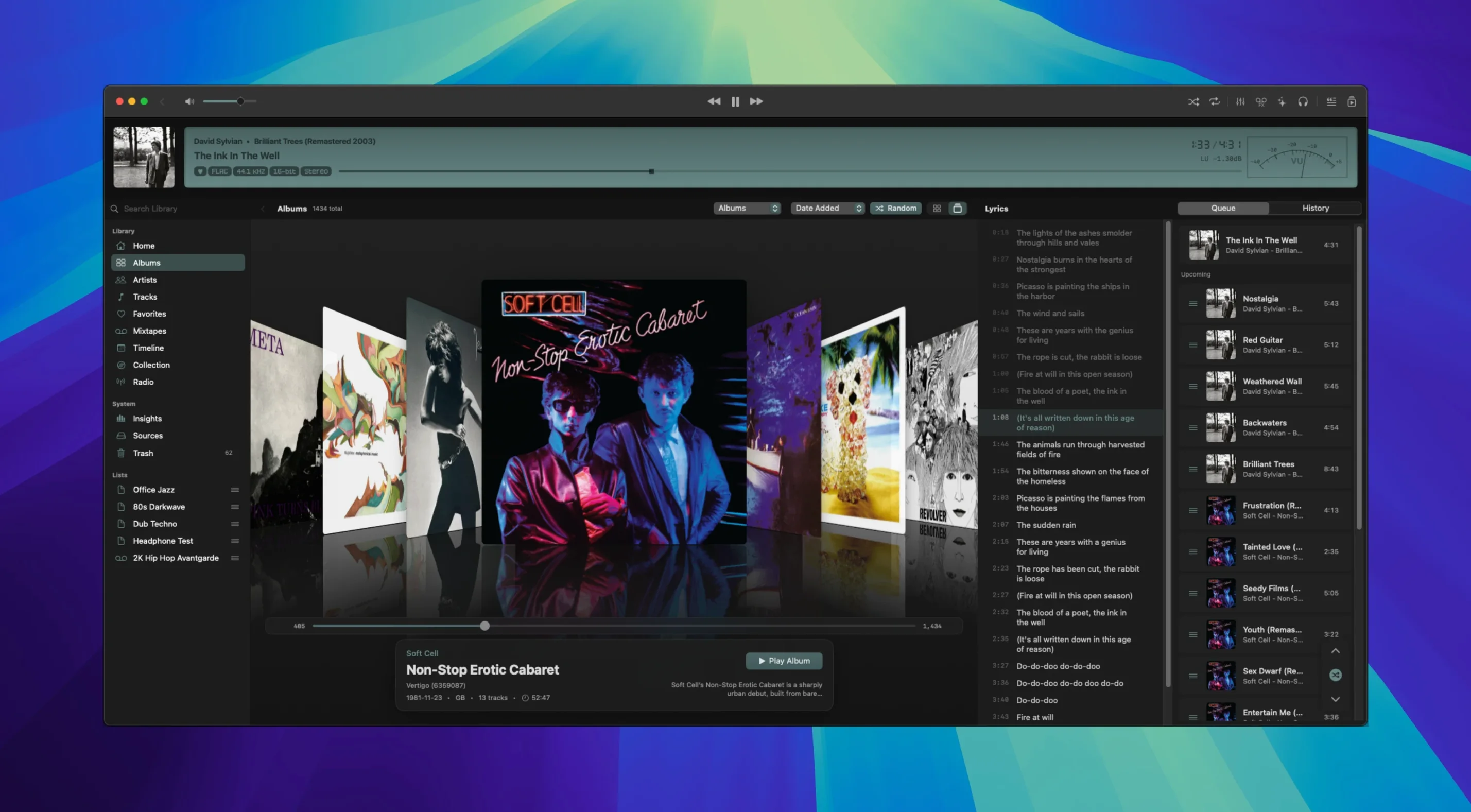
Gapless playback is one of those things you stop noticing the moment it works, yet it defines how an album breathes. Zenteek respects that. It opens on a clean single-window layout: your library on the left, the current queue in the centre, and a detail panel that shifts context depending on what is playing.
Kjell Bublitz built the player as a native macOS app, and it shows in the small decisions. Audio monitors sleep when not needed, which keeps CPU use modest. Format support is broad: FLAC, ALAC, DSD, MP3, AAC, OPUS, WAV, and AIFF. Direct DSD playback over DoP arrived recently, complete with seeking and smoother device switching, and the main display now carries small DSD output badges and tooltips so you always know exactly what the signal path is doing.
Good for
- People with large, mixed-format local libraries who want one player for everything.
- Listeners who care about gapless transitions between tracks.
- DSD users who need DoP output with clear status indication.
- Anyone who prefers a native Mac interface over Electron or web-based alternatives.
Keep in mind
- It requires macOS 14 or later.
- Lyrics search is present, but the visualizers are the more polished secondary feature.
- The interface language is English only.
A session: new arrivals and a quick queue
You drop a folder of DSF files onto the dock icon. Zenteek indexes them in real time: no spinning progress bar, no separate import dialogue — the tracks simply appear in the library as though they had always been there. The column browser across the top lets you narrow by artist, album, or genre with a single click, and the global search field in the toolbar responds keystroke by keystroke, filtering the library before you finish typing a word.
Double-click the first track, then hold ⌥ and double-click the fourth. The queue panel populates with tracks one through four, arranged in order. You drag the third track up one position — the adjustment is immediate, no flicker. A small DSD badge appears next to each title in the queue, confirming the signal path will stay native all the way to the DAC. You press play.
During playback, pressing ⌘L opens the lyrics panel. It queries in the background and slides results into the right-hand detail area without interrupting the queue or the waveform visualisation beneath it. If the source is gapless — a live recording, a suite — the transition between tracks two and three is invisible. The audio monitors in the interface remain dark for the first thirty seconds, then wake only when you switch to the DSP tab, saving cycles you never need to think about.
Rewards tucked outside the obvious workflow: hover-tips and hidden status
Several conveniences in Zenteek sit just outside the obvious workflow, and they reward a little exploration.
- Instant DoP status. Hover over the DSD badge in the now-playing bar. A tooltip reveals the exact output mode, sample rate, and whether the connection to the DAC is stable. This is especially useful after a device switch, when you want confirmation that DoP negotiation succeeded.
- Queue assembly with modifiers. Holding
⌥while double-clicking a track adds it to the end of the current queue without clearing what is already there. Holding⌥⇧inserts it directly after the currently playing song. This turns the library browser into a quick playlist builder. - Sleeping monitors. The DSP and visualiser panels do not draw CPU cycles unless they are visible. You can keep the spectrum analyser open while working, and closing it truly silences its processing — not just its display. On a MacBook running on battery, this matters.
- Global search scope. The search field indexes file names, metadata, and folder paths simultaneously. Typing "DSD" returns every DSD-encoded file in the library, regardless of whether the format tag is written into the metadata. For libraries that have grown organically over years, this alone can save an afternoon of manual tagging.
- Visualiser as a secondary monitor companion. If you drag the Zenteek window to an external display and switch to full-screen visualiser mode, the animation runs at the display's native refresh rate, not the MacBook's internal panel rate. It is a small touch, but it keeps the motion fluid on a 120 Hz screen.
In short: the player never insists on being the centre of attention, yet the tools for a focused listening session are all within a single keystroke or a modifier click, ready when you are.





Correspondence 0
Take a chair or join the table to send a letter.
No correspondence on this note yet. Letters are read before they appear.