 LeCoqRoti
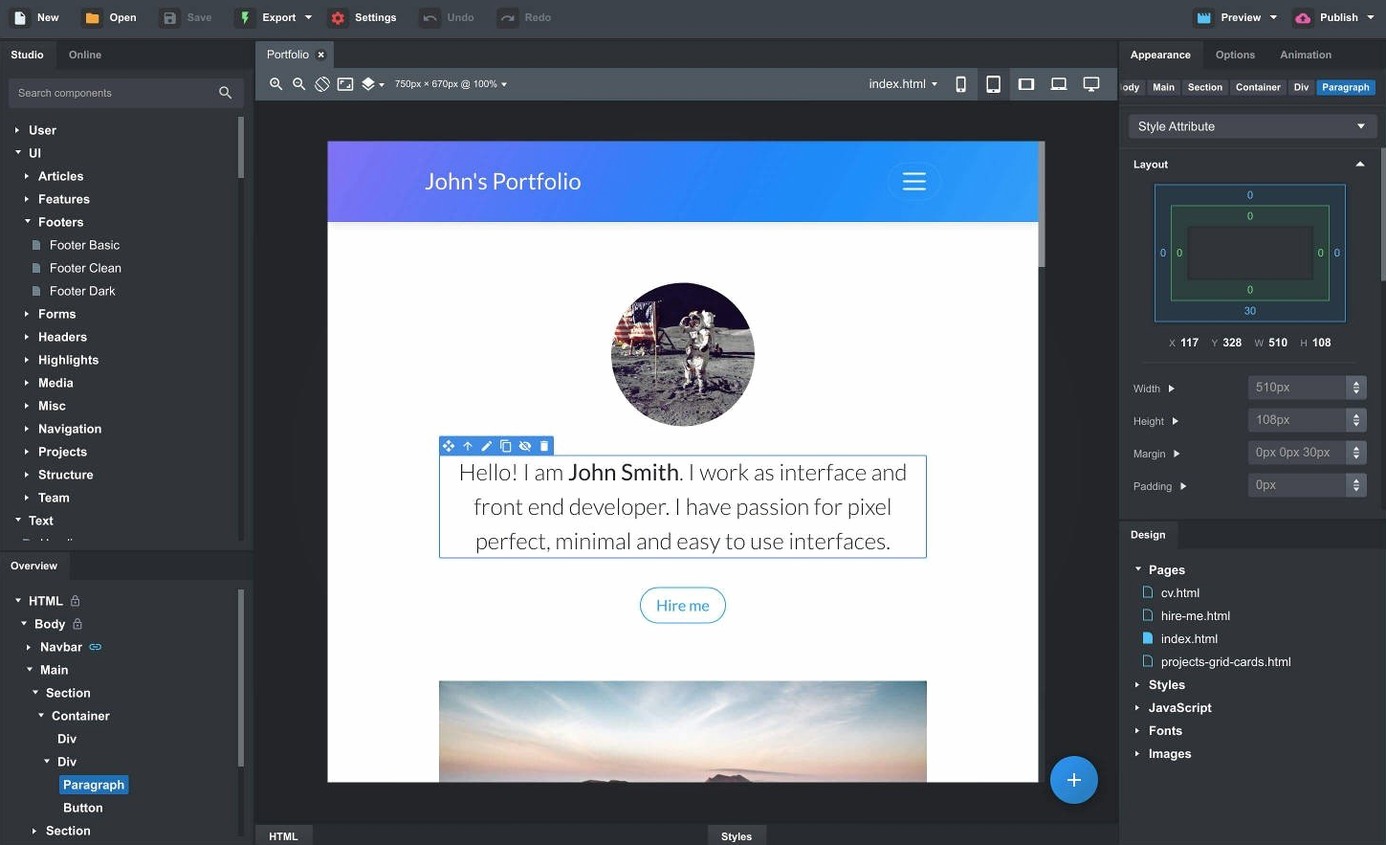
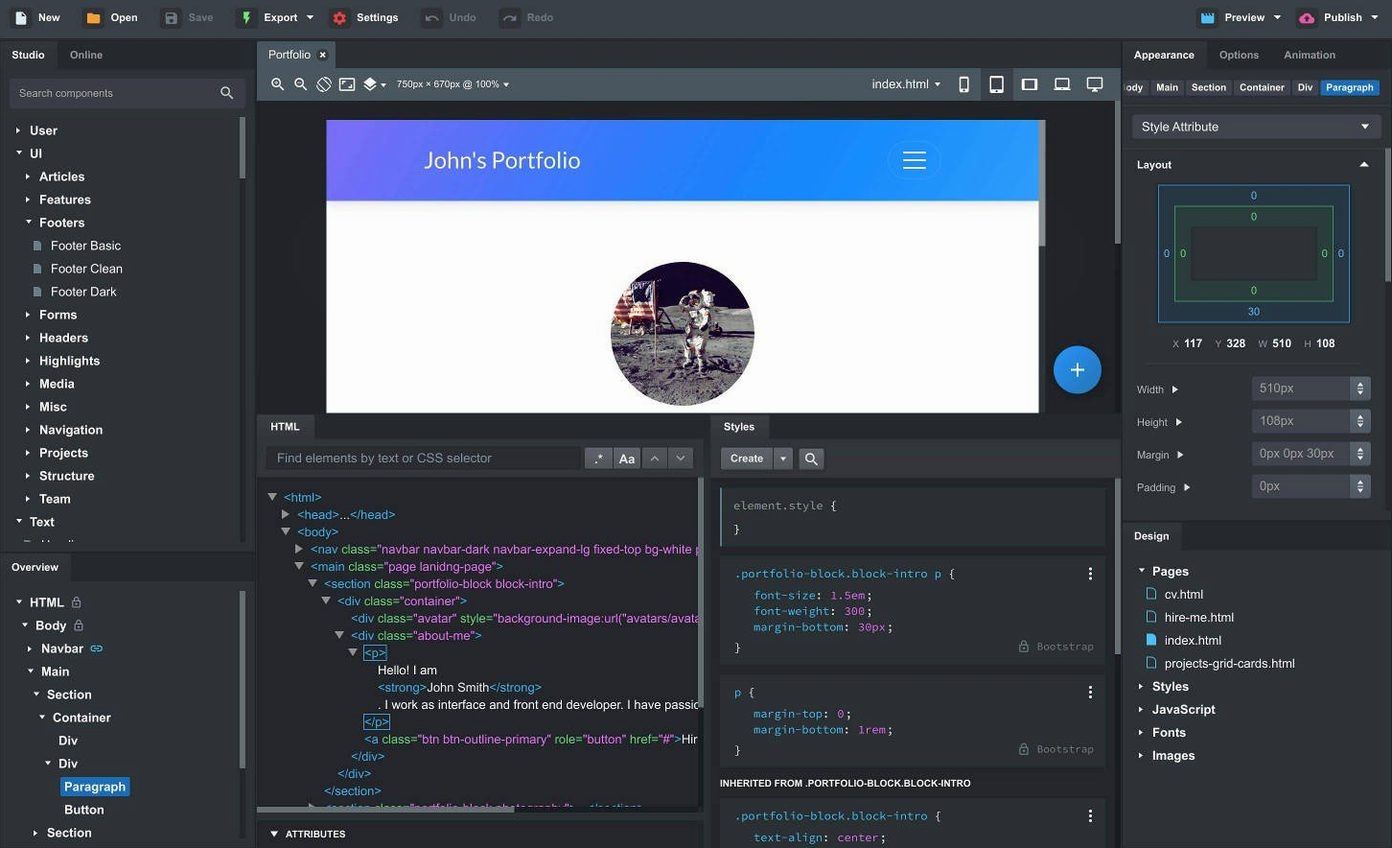
Anyone who has spent an afternoon nudging breakpoints in a code editor will recognise the space Bootstrap Studio occupies: it is the same Bootstrap framework you already know, wrapped in a visual tool that feels less like hand-coding and more like assembling a considered layout. The grid, the utility classes, the component library — they are all present, just accessed through a different kind of precision.
SCSS and custom components: beyond the drag-and-drop surface
For an experienced user, the value shifts from the pre-built headers and galleries to the things you can shape yourself. Full SCSS editing sits alongside the visual canvas, so a variable change in one place cascades through every instance. When a repeated pattern emerges — a card variant, a bespoke navbar — you can select those parts and save them as a custom component. The result is a private library that matches your own conventions, not a generic starter template. Combine that with live preview across multiple browsers and devices, and the feedback loop tightens considerably.
Recent additions: AI models and finer control over behaviour
The current release introduces gpt-4o-mini and gpt-4o to the AI Assistant, which means the generated markup arrives with a sharper understanding of context. On the interaction side, a new Sticky On option for navbars and a Click Outside to Close setting for modals give you finer control without writing extra JavaScript. These are small, deliberate adjustments — the kind that make a tool feel maintained by people who use it daily.
A page build, from blank canvas to live preview
Open a new project and Bootstrap Studio presents a clean workspace: the component palette on the left, the canvas in the centre, and a structured overview panel on the right. For a landing page, start by dragging a Navbar component onto the canvas. The overview immediately shows its internal hierarchy — brand, toggler, collapse area — and clicking any part selects it directly, without hunting through nested divs in code.
Drop a Hero section below the navbar, then replace its placeholder image and text by editing the attributes in the options panel. Dragging a Container inside the hero keeps the content constrained; a Row and two Column components split the area into a headline block and a call-to-action button group. The canvas reflects every change as you make it, so you see the exact responsive behaviour at the current breakpoint.
To add depth, open the Online Library tab and search for a community-built pricing table. Preview it, then drop it into a new section below the hero. Because the component is linked, any adjustments you make — colours, spacing, font choices — propagate to other instances on the page. When the structure feels right, open the live preview in a second browser window and resize it to watch the grid reflow. The exported HTML is clean and semantic, ready to drop into a project without stripping out tool-generated noise.
Bootstrap version default: set it before you drag anything in
A handful of preferences shape the experience more than the defaults suggest. Open Settings > General and set the default Bootstrap version to Bootstrap 5.3 unless a legacy project demands otherwise; this determines which component variants and utility classes appear in the palette. In Settings > Editor, increase the font size slightly if you spend long sessions writing SCSS — the default is compact and rewards a small adjustment.
Under Settings > Export, enable Minify HTML and Minify CSS for production builds. The difference in file size is modest but meaningful on slower connections. If you work across multiple machines, point the Components Library path to a synced folder so your custom components travel with you. Finally, in the AI Assistant settings, select gpt-4o for layout generation and gpt-4o-mini for utility tasks like writing placeholder content; the latter is faster and perfectly adequate for filler text.
Apple Silicon feel: a dozen pages won't slow the preview
On an Apple Silicon Mac, Bootstrap Studio launches in under three seconds and stays responsive with a dozen pages open and multiple live preview windows running. Memory use settles around 400–500 MB for a medium-sized project with custom SCSS and linked components — light enough to sit alongside a browser, a design tool and a text editor without triggering swap. The autosave is unobtrusive; I have yet to lose work to a crash across weeks of regular use.
The live preview engine deserves particular mention. It communicates changes to connected browsers with negligible delay, and the multi-device view lets you see a phone, tablet and desktop rendering simultaneously. This turns responsive testing from a series of manual browser resizes into something you can scan at a glance. The SCSS compiler keeps pace with edits, flagging syntax errors in the panel without blocking the canvas. On Intel hardware, the same projects run with a barely perceptible increase in compile times, but nothing that disrupts flow.
A frontend freelancer’s morning
A freelance designer takes on a three-page portfolio site for a photographer. The brief arrives as a PDF with rough wireframes and a colour palette. She opens Bootstrap Studio, sets the project to Bootstrap 5.3 and drags in the photographer’s existing CSS file through the import panel. The typography and link colours snap into place across the canvas without manual reassignment.
She builds a reusable gallery component from a row of thumbnail cards, saves it to her custom library, then uses it on all three pages. When the client asks for a last-minute change — a sticky navbar with a different behaviour on mobile — she selects the navbar, checks Sticky On > Medium devices and up and moves on. The whole build, from blank file to exported HTML sitting in the client’s Dropbox, takes under two hours. The exported code is clean enough that the photographer’s hosting provider accepts it with no platform-specific corrections. In short: the tool removed the friction between a visual idea and a shipped page, and that is precisely the work it is designed to do.








Correspondence 0
Take a chair or join the table to send a letter.
No correspondence on this note yet. Letters are read before they appear.