 LeCoqRoti
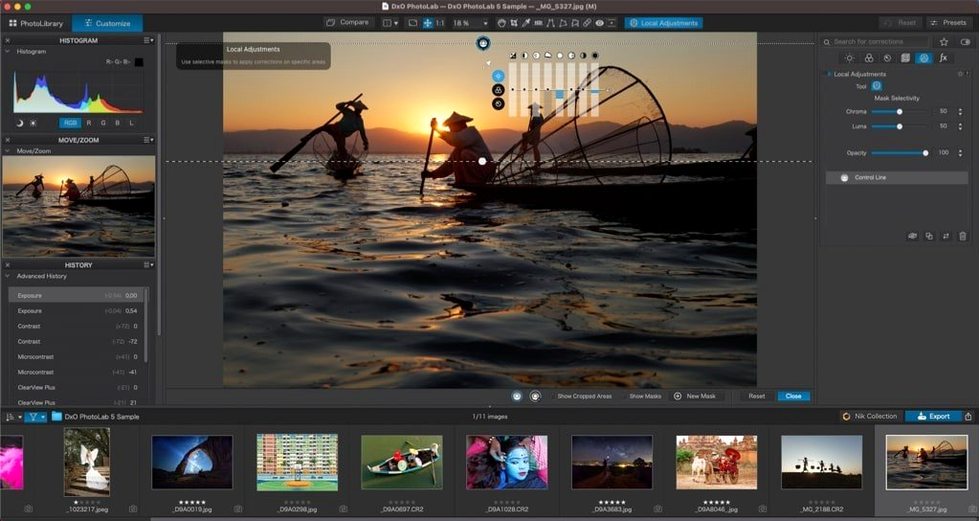
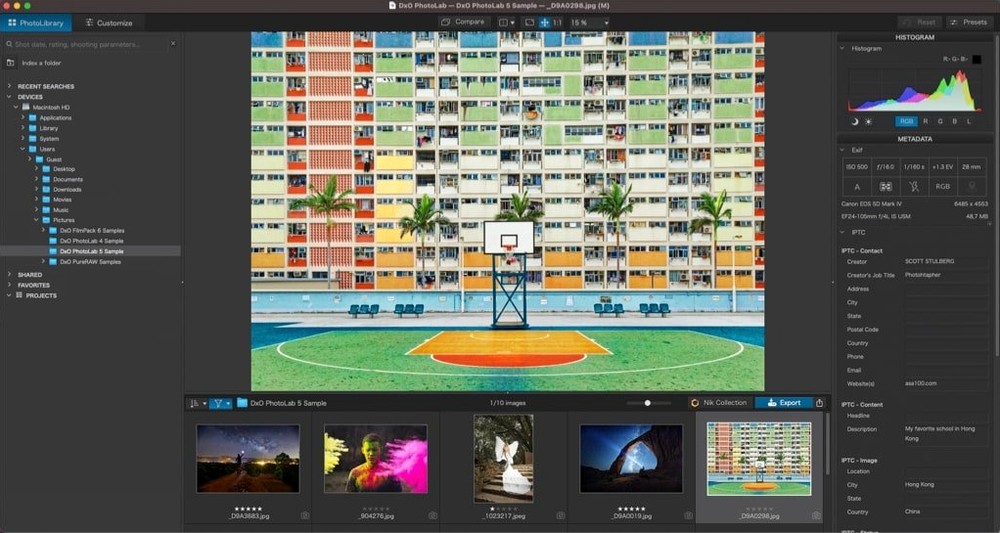
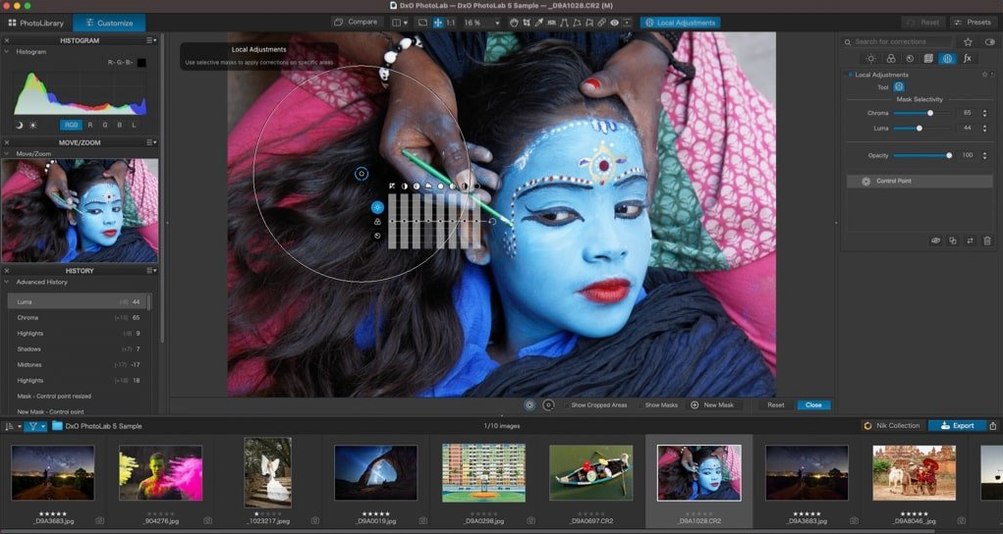
Many RAW editors give you sliders; few correct the lens that took the photograph before you touch a single control. DxO PhotoLab 9 begins with the optics. It reads the camera and lens combination, then applies a lab-measured correction profile automatically — a quiet first step that often removes more distortion and vignetting than a manual edit ever could.
DeepPRIME at ISO 6400: pulling feather detail from what looked like mush
- Photographers who want optical corrections applied before creative work begins
- High-ISO work: DeepPRIME noise reduction preserves detail that luminance sliders smudge
- Local adjustments copied across a set — sync a brushed exposure correction to twenty frames in one action
- Masking by subject type: skies, people, backgrounds and animals selected with a single click
Correction profiles: supported camera and lens required in DxO’s database
- The interface expects you to work in its structured panel layout; it does not offer the freeform canvas of a pixel editor
- Correction profiles require a supported camera and lens — check DxO’s database for less common pairings
- Sync and copy operations rely on consistent framing between images
Mistakes: habits that work against the software
A common early error is treating PhotoLab like a generic RAW developer and reaching for the exposure slider before the optical corrections have done their work. The lens profile loads silently in the background, and a new user may not notice it is already removing barrel distortion and corner softness. Adjusting geometry by hand on top of an active profile often doubles the correction, leaving edges stretched in ways that are hard to undo later. Let the module finish first, then decide whether anything needs a nudge.
Another habit worth breaking: applying noise reduction globally at full strength. DeepPRIME works best when you tailor it to the zone that actually needs it. A sky at ISO 800 rarely demands the same treatment as a shadowed face at ISO 12800. Local masks with a reduced intensity for cleaner areas keep the rendering natural and cut processing time noticeably.
Users switching from Lightroom sometimes expect the crop tool to behave identically. PhotoLab crops are non-destructive but live inside a fixed panel; dragging the edges does not re-center the same way, and the aspect-ratio lock is easy to miss on first use. A quick check of the Crop palette before committing saves a round trip.
Finally, the U Point local adjustment system confuses those who treat it like a brush. A control point does not paint an area — it samples colour and luminance under its centre and spreads intelligently. Placing six points where one would do creates a muddled mask that fights itself. One well-positioned point with a carefully set radius usually yields a cleaner result.
Catalog-free browsing: forty-megapixel RAWs populate without an import step
On an Apple Silicon Mac the application launches crisply and browsing a folder of forty-megapixel RAWs feels responsive rather than laboured. The catalog-free approach means no import step: you point the file browser at a folder and the thumbnails populate as fast as the disk can feed them. This lightness extends to the editing workspace, where switching between the Customize and PhotoLibrary tabs is immediate.
DeepPRIME XD3 exports are where the processor earns its keep. A single high-ISO frame can take fifteen to twenty seconds of sustained computation; a batch of sixty will occupy the machine for fifteen minutes or more. The application remains usable during export, though you feel the system working. Fans spin up on Apple Silicon laptops, but the interface does not stutter. Memory pressure is moderate: with a dozen images open and adjustments applied, the app typically holds under three gigabytes, leaving headroom for a browser and a communication tool alongside.
Stability over a working day is good but not flawless. The occasional crash tends to occur when rapidly switching between heavily masked images or when an external drive disconnects mid-browse. Unsaved edits survive most crashes — PhotoLab writes sidecar files and internal snapshots frequently — but it is wise to pause before yanking a cable. The Windows version has a longer reputation for quirks; the macOS build feels like the more settled sibling.
Resource use is predictably tied to the correction pipeline. Optical corrections and Smart Lighting are computationally cheap. ClearView and PRIME noise reduction are not. A useful habit is disabling ClearView on images you are only skimming for keepers, then enabling it once the selects are made. The preview updates fast enough that this does not slow culling.
Wildlife at dusk: bonding with the software when your gear hits its envelope
Photographers who shoot at the extremes of their gear’s envelope tend to bond with this software fastest. A wildlife photographer working at ISO 6400 in dusk light will see DeepPRIME pull feather detail from what looked like mush in the camera’s own JPEG engine. An architectural photographer with a wide zoom will appreciate that the lens profile corrects complex distortion patterns — mustache distortion on a 16–35 mm, for example — without manual intervention, keeping verticals straight before any perspective correction is applied in a second tool.
Colour-critical work also benefits, though indirectly. DxO’s camera profiles are not generic Adobe Standard-style interpretations; they are built from the same lab measurements that inform the lens modules. A portrait photographer who needs consistent skin tones across two different camera bodies can apply the respective body profiles and get a shared starting point that requires less HSL surgery later. The DxO Smart Lighting control, used sparingly, lifts shadows while protecting highlights in a way that feels more physically plausible than a simple curves adjustment.
Users who work in series — wedding edits, event coverage, time-lapse preparation — gain the most from the copy-and-paste logic. Applying a set of local adjustments to two hundred frames is a two-click operation once the first image is tuned, and the Quick Select Subject Types sync feature means you can paste a sky mask to a batch and have it adapt to each frame’s composition. This alone saves hours over painting gradients frame by frame.
Less obviously, the software rewards the photographer who enjoys understanding their tools. The module database is deep, the correction parameters are exposed, and the documentation for what each slider does under the hood is unusually frank. A technically inclined user who reads the white paper on DeepPRIME’s demosaicing approach will make better decisions about when to apply it and at what strength. Those who prefer a one-click preset and move on may find the interface too layered, but for the curious it is a quiet pleasure to explore.
Option-drag a slider: temporarily disabling auto-preview while you adjust
Several details in the interface repay attention. The Preview magnifier can be toggled with a long press on the image — useful for checking focus without switching tools. Holding the Option key while dragging a slider temporarily disables the auto-preview, so the image does not flicker through intermediate states on a slower machine. It is a small thing, but once learned it becomes muscle memory.
The Auto button on the tone curve panel is not a generic contrast boost; it reads the image histogram and sets black and white points conservatively. Many images need only that click plus a slight vibrance lift to look finished. Similarly, the Magic Wand in the local adjustments panel selects a luminance range rather than a colour, making it effective for isolating backlit subjects against bright backgrounds — a scenario where colour-based selections typically fail.
Keyboard shortcuts: pressing G cycles through the grid overlay options, which is faster than reaching for the menu when checking alignment. The \ key toggles the before-and-after view without clicking the split-screen button. And if you hold Shift while adjusting a control point’s radius, the increment changes in finer steps, giving precise control over the mask falloff — a detail not obvious from the interface alone.
Export presets can embed a custom colour profile and resize logic in one saved recipe. Photographers delivering both full-resolution TIFFs and web-sized JPEGs from the same shoot can set two presets once and never revisit the export dialog. The presets also remember the metadata stripping level, which is handy when preparing images for platforms that demand clean EXIF fields.
In short: PhotoLab’s surface is orderly and a little restrained, but underneath sits a toolset that rewards those who slow down and learn its particular logic. The optical-first approach, the genuinely intelligent noise reduction, and the batch-local-adjustment workflow combine into something that feels less like a darkroom and more like a disciplined printing process — one where the negative is read thoroughly before any dodging or burning begins.








Correspondence 0
Take a chair or join the table to send a letter.
No correspondence on this note yet. Letters are read before they appear.